Showing posts with label Scratch. Show all posts

Tuesday, 8 April 2014

The year coming to an end.

The school year is coming to an end, and so is my obligation to write on this blog. I might continue posting on it from time to time, as I plan to keep studying after I finish this course.

It has been a great year and I have learned so much through it. I remember starting using Scratch, which was a great way of being introduced to games development, but unfortunately a very limited tool. 

1st Level of my Taco Vengeance Game
Scratch programming

Tuesday, 18 March 2014

Work Experience

Fro the past couple of weeks I haven't posted anything to this blog since I was on work experience. I went to Plymouth through the Leonardo da Vinci Programme, and was placed in the Marketing Department of City College Plymouth.

While not being in my specific area, the work placement was a very unique and fantastic experience. I improved my communications skills, learned work ethics in a professional environment and also learned more about games programming.

 My main tasks there were to upload and tag pictures in the College's website. Since it wasn't a very interesting task, I came up with an idea of a game where the game would ask questions about the user and in the end suggest him suitable careers and courses.

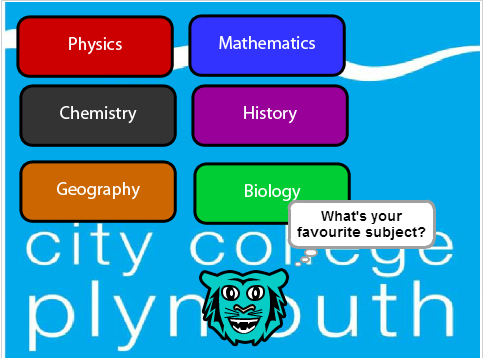
Sample of the game I created

Monday, 4 November 2013

A recap of the first Term

This post is going to be a quick recap on things I learned last term.

Photoshop:
This is a massive tool, there are so many things you can create with it and I only scratched it's surface using only 4 tools(the vector tools). It is tough, but once you learn how to use it, it is fun! 
Taco used in my game.


Programming:
First of all, I learned how to program! It is a very logical process and it has to be very specific and clear, since you are talking to a computer, a very powerful but dumb machine. Unless you are specific and clear the computer won't know what to do, or worse, it may break your program! It is also very challenging, at some points frustrating, but very very rewarding after you complete your program.
Code used for the map.


Course:
Aside from the two tools cited previously, I also learned how to use blogger, yes this is my first blog, "gave wings" to my creativity while creating the graphics and story for my game while also having original concepts and design.

What I also learned but it is not related to any software or computer, was how to organise myself for classes and assignments, having to manage various assignments at the same time, and also how to write a report.

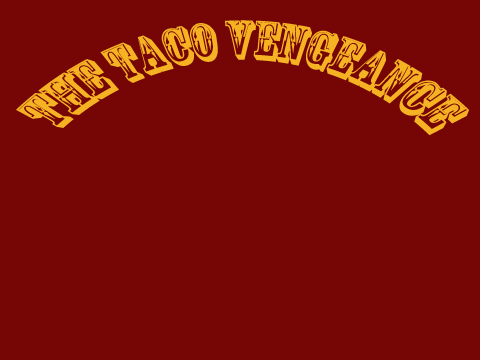
The final result was this brilliant piece of art called "The Taco Vengeance":


 The game is not completed but it basically is a sum of all I learned last term.

Tuesday, 22 October 2013

2D Game - Update#4

The game is almost finished, but very bugged now. I will have to do lots of tests to fix them all. The game report is also done. Main things to work on:

  • Fix bugs
  • Add level 3
  • Add sounds
  • Add score
  • Switch stickmen costumes

Monday, 14 October 2013

2D game graphics

Today I finished(I think) making the levels for my 2D game. I created them in a bigger size than scratch's 480x360 canvas because I wanted to make the player able to scroll more than just the small area like in the sniper template I posted yesterday. Here are them:

Level 1

Level 2

Level 3


Scope movement
I also did some coding for the first level, but it is in very early stages. One piece of coding is the movement of the sniper scope. Pretty much the same covered in the previous post with a little bit of tweaking to have a wider and faster movement.

Sunday, 13 October 2013

Map Scrolling

Side scrolling is essential for 2D games. Most of them rely on this feature to move the character across the level, and they do so in a very clever way. Instead of having one big screen, the level is divided in parts and they move along the screen, instead of the character.

Since we're using scratch, the screen resolution is 480x360 pixels, so we'll create our level with double the size of that(960x720) and then we will divide it in four parts.

Friday, 11 October 2013

2D game - Update#2

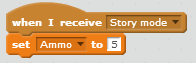
Today I created a little bit more of code to my game, working on the variable "Ammo", which basically displays how much ammo you have on your gun.

This sets the ammo to 5 when the game starts.

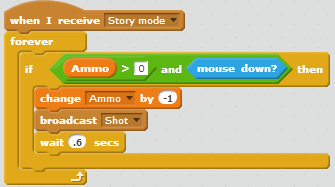
The code for shooting.
Note on the shooting code that it only broadcasts the shot IF ammo > 0. This is also very important when adding to the score, which I haven't done yet.

2D project - update#1

In the last couple of weeks I have been working on a 2D game. So far I have done good progress, the genre has been defined, I have a small story for the game, got the menu done and I have most of my graphics made. Here's an overview:

The Story
The game tells the story of Johnathan, aka John, a bitter man who had his childhood scarred by a malevolent Taco and now has declared war on the crispy menace. The story will be told through cutscenes and will progress through gameplay. Various events in-game events will determine how John will plan his next move against the enemy.

Gameplay
How John will destroy the evil, you ask? With his super powerful .50 caliber sniper rifle. You will control his scope and snipe your targets from afar in order to complete the objectives. In a nutshell: it's a sniper game.
Depending on the mission you will be rated on how many tacos you destroyed, how fast you did that or if you accomplished the mission objective. To add variety to the game I will include touristic places, like the Colosseum.

Below are some of the graphics that will be used for the game:
The enemy: Taco

Sound Button

Menu Background

Bullet


Tuesday, 1 October 2013

2D Game project - The Taco Vengeance

The next project I'll be working on is a 2D game with the provisional name of "The Taco Vengeance". It will be a sniper game where you control a sniper called Jonathan, aka John, a man whose life mission is to destroy as many Tacos as he can, for they scarred him in his childhood. Now as a grown man he decides to start his quest for revenge.

John's worst enemy
The view of the game will be the scope of the sniper and the objectives might vary, from destroying a specific taco or destroying as many tacos as you can within a time limit. I plan to have 5 levels and they will all be different, from the local Tacoland shop to the Colosseum! The story will be told through cut scenes in between the missions.

The tacos will be in different locations throughout the levels, from a table, to a customer's hands or even flying around! But also be careful not to shoot other people's cellphones or sandwiches!


Wednesday, 18 September 2013

The Attack of The Dragon Gryzko

Today I combined all the knowledge I gathered over the past few days and put it all together in one game: The Attack of the Dragon Gryzko. A game where you have to hunt down a mighty dragon attacking your castle by using your magical power.

Game setup code

Above is the initial setup of the game. Resetting score to 0, Time 30 seconds, Amount of ammo you have and Health. I also created the timer in this code, so the variable timer will decrease every time one second passes. To the right is the code that defines when the game is finished and, at the left bottom is the high score table.

Since I wanted Gryzko to attack me and increase the difficulty of the game, I had to give him a flame strike that deals 10 damage to me. And also I had to set up how I would score whenever I hit the mighty dragon.
Attack damage1
Random attack

For the Health, I used the same script posted previously in my blog. Next, I created a code to control how to reload and decrease ammo after every shot, that is described in the picture below.

Reducing ammo

And finally I created the code to decrease the amount of lightning bolts you have before reloading. Also I added a different time for each sprite to appear, creating a nice little animation.

Reloading

You can find the game below:

Saturday, 14 September 2013

Variables: Health, Timer and other uses

Variables are parameters you create that can represent various attributes such as time, health, number of users and basically anything you want. You can find the variable creation menu on the Data section of Scratch and to create one all you need is to click the button "Make a Variable". In the example below we created the variable "Health" to represent the total life our character will have in the game. All the commands related to variables are present in the menu as well.

Creating Variables
Note: when creating this variable we set it for all sprites so we can specify how will the enemy will interact with the character and set how much life he will lose or gain.

Then we create a sprite with various costumes to represent our health bar. Notice on the left that each costume shows a small decrease in the amount of green and the same increase in red, representing life loss or gain.

Drawing the health bar


Next we need to write the script of how will the health variable will work.

Changing health bar costumes

Now deciphering the code; when the game starts we want the health to be set to 100, so the costume will be the full health costume. If the character is damaged by an enemy we need to change the costume according to how much health the character will have after being damaged and, since we made 10 different costumes for the health bar, we divided the current health of the character in multiples of 10, setting the costumes accordingly. This creates the effect that the health is decreasing as the character suffers damage.

But in order to damage our hero we need to create enemies and program them to do so. We chose two sprites that have 2 or more costumes to create an element of randomness as to when will the enemy attack, i.e. only one of the costumes will damage the character when in touch with it, the other will be the moment our here can escape.The first line of code tells the sprite to point towards our hero, basically just so the enemy can deal a frontal attack, instead of attacking with their backs turned to the character. The next line tells the sprite to change their costume after a random time, in our case, 1 or 2 seconds, but you may set it as you see fit. In the last line we set that when the the sprite is in the second costume and touching the character it will decrease the variable health by 10, meaning it caused damage to the hero. 

Changing enemy costume

And finally we need to give our hero a chance to survive, so we create a pickup that will restore health when touching the character. But we don't want it to restore health forever, so we add the "Hide, Wait 3 Seconds and Show" commands so the pickup will disappear for a few seconds before being reset. The "Set Size" command simply diminishes the size of the pickup to fit the screen in a better way.

Reducing health


Below is the game:

Tuesday, 10 September 2013

First animation on Scratch and the Scratch Cards.


Using a very detailed step-by-step tool, I managed to create this little animation very easily:


Scratch has a Help session with 12 different cards that teach you how to do certain animations with your sprite(s):

Sample Scratch Card
With the cards I learned how to add move to the sprites either using the arrow keys or the mouse. Below is a command that makes your sprite move slowly towards the mouse direction. Note that the ''set rotation style'' allows the sprite to move around without turning upside down. This is useful not only in this instance but in many others where you have to deal with the character movement.

Rotation code


My account on Scratch


Today I created my Scratch account. Scratch is a free online tool to design 2D games.


My Account

I played a few cool games such as:
  • Chakra: A game where you play a ninja trying to deflect projectiles with your Shuriken. The game also features various power-ups to help you in your objective. The movement of the ninja is also very neat.